

Making Tax Digital for Landlords: A Simple Guide
7th August will soon be here. Making Tax Digital is now changing how landlords keep records, send updates and complete their tax returns. But who needs to join, when do the rules apply, and what are the key deadlines? This simple guide explains the changes, the income thresholds and the practical steps landlords should take now to get prepared.
Updated July 2026
Making Tax Digital for Income Tax is now being introduced for landlords.
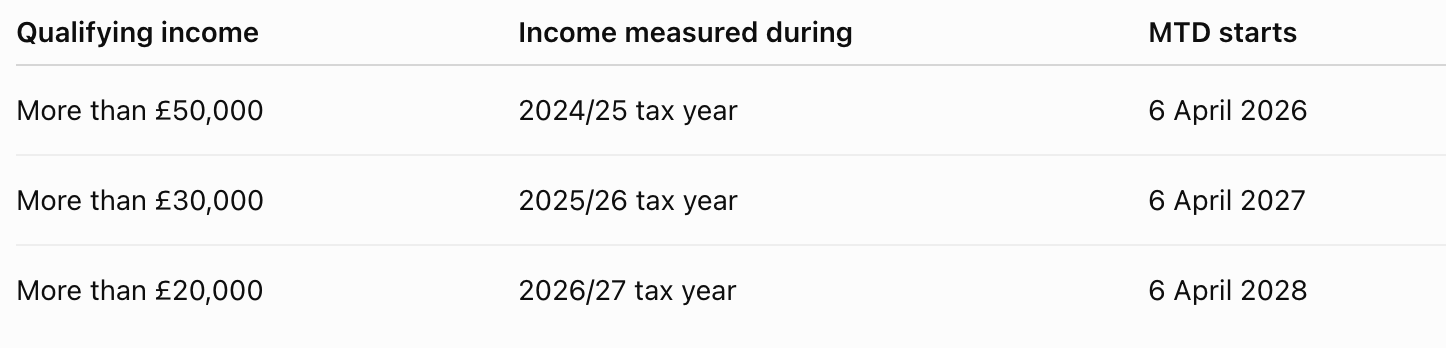
Since 6 April 2026, landlords in the first phase have had to keep digital financial records, send quarterly updates to HMRC and submit their annual tax return using compatible software. The rules are being introduced in stages, based on the amount of gross property and self-employment income you receive.
Landlords who joined the scheme on 6 April 2026 must send their first quarterly update by 7 August 2026.

What is Making Tax Digital?
Making Tax Digital, often shortened to MTD, changes how some landlords record and report their income. Instead of gathering everything together once a year, landlords within the scheme must:
- Keep digital records of their property income and expenses.
- Send a summary to HMRC every three months.
- Complete and submit their annual tax return through compatible software.
The quarterly updates are not full tax returns. They are simply summaries of the income and expenses recorded in your software. You do not normally need to make final tax or accounting adjustments before sending them.

Who needs to use it?
You generally need to use Making Tax Digital for Income Tax when:
- You are an individual landlord or sole trader registered for Self Assessment.
- You receive property income, self-employment income or both.
- Your total qualifying income is above the relevant threshold.
The rollout dates are:
HMRC will usually review your previous Self Assessment return and write to you when it believes you need to join. However, you remain responsible for checking your own position, even if you do not receive a letter.
New landlords do not normally have to start using MTD until after they have submitted their first Self Assessment tax return.

What income counts?
Qualifying income is the gross income you receive from property and self-employment.
Gross income means your income before expenses and tax are deducted. It is not the same as your profit.
For example, imagine you receive:
- £38,000 in gross rental income.
- £16,000 in self-employment turnover.
Your total qualifying income would be £54,000, even if your expenses reduced your final taxable profit.
If you jointly own a rental property, it is normally your share of the property income that counts. For example, if a jointly owned property generates £40,000 a year and you receive an equal share, £20,000 would count towards your qualifying income.
What income does not count?
Other types of personal income do not usually count towards the MTD qualifying-income threshold. Examples include:
- Salary or employment income taxed through PAYE.
- State and private pensions.
- Dividends.
- Your share of profits from a formal partnership.
However, these sources may still need to be included in your annual tax return. They are excluded from the MTD threshold calculation, not necessarily from tax altogether.
Rules can be more complicated if you receive foreign property income, are not resident in the UK, use trusts or have several different business arrangements. Professional tax advice may be helpful in these situations.

Keep digital records
Landlords within MTD must keep digital records of their property income and expenses.
Depending on the software you choose, you may be able to:
- Connect a rental bank account and import transactions.
- Scan receipts and invoices.
- Enter transactions manually.
- Continue using spreadsheets connected to HMRC through bridging software.
You must also continue keeping supporting documents such as invoices, receipts and rental statements, just as you would for a normal Self Assessment return.
Using a separate bank account for your rental activity is not an MTD requirement, but it can make record-keeping much easier. It helps separate property transactions from personal spending and can reduce the number of corrections needed.

Sending quarterly updates
Every three months, your software will total the property income and expenses recorded so far.
The updates are cumulative. This means the second update covers the period from the start of the tax year to the end of the second update period, rather than only covering the previous three months.
For landlords using standard tax-year periods, the deadlines are:
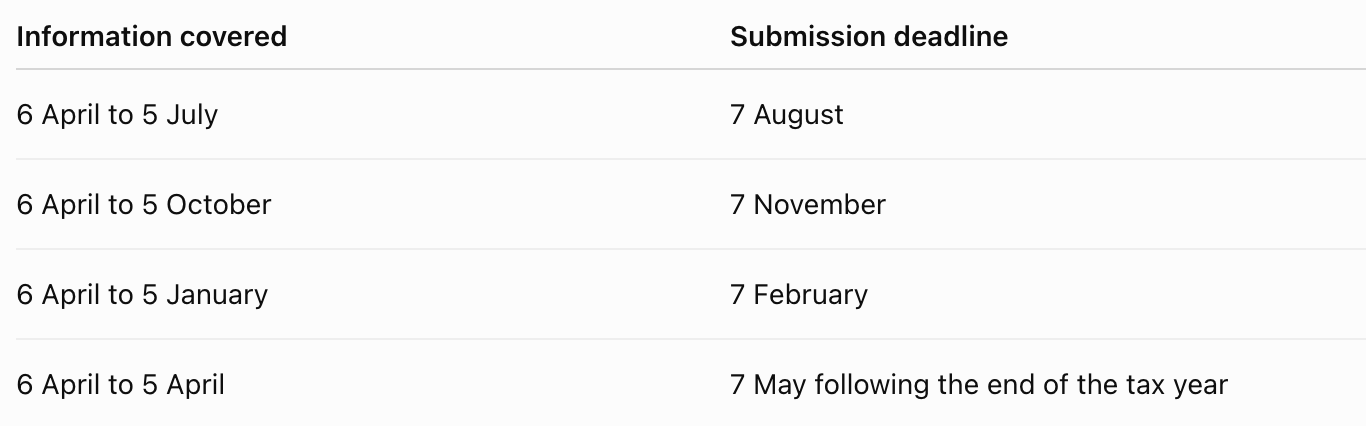
Some landlords can choose calendar update periods running from 1 April to 31 March. The submission deadlines remain the same.
HMRC receives totals for the different income and expense categories. It does not receive copies of every individual receipt or invoice as part of the quarterly update.

Submit your annual tax return
Quarterly updates do not replace the annual tax return. After the tax year ends, you will need to:
- Check your property income and expenses.
- Make any necessary tax or accounting adjustments.
- Include other taxable income and gains.
- Review the tax calculation.
- Submit the completed return through your MTD software.
The normal 31 January deadline still applies.
For example, landlords who began using MTD on 6 April 2026 must submit their tax return for the 2026/27 tax year by 31 January 2028.

Choose the right software
You must use software that is compatible with Making Tax Digital for Income Tax. This could be:
- An all-in-one accounting or landlord bookkeeping system.
- Bridging software that connects an existing spreadsheet to HMRC.
- More than one product, provided the systems work together correctly.
Before choosing a product, check that it can support the tasks you need. This includes keeping digital records, sending quarterly updates and completing the annual tax return.
Some products may handle quarterly updates but rely on another product for the annual return. If you use more than one system, make sure the information can be transferred between them using suitable digital links.

Sign up for MTD
Being registered for Self Assessment does not automatically register you for Making Tax Digital.
You or your accountant must complete the separate MTD sign-up process. You will normally need to be registered for Self Assessment and have submitted a tax return within the previous two years.
Once registered, you will need to authorise your chosen software to connect to HMRC.
Are there exemptions?
Some people are automatically exempt, while others need to apply to HMRC. You may be able to apply for a digital-exclusion exemption when it is not reasonable for you to use digital software. This could be because:
- Your age, health condition or disability prevents you from using suitable technology.
- Your religious beliefs are incompatible with digital record-keeping.
- Reliable internet access is not available because of your location.
Simply being unfamiliar with accounting software, having only a small number of transactions or facing extra costs will not normally be enough on its own. HMRC considers applications based on individual circumstances.

What are the penalties?
HMRC is taking a softer approach to quarterly updates during the first year of mandatory MTD. There are no penalty points for missing a quarterly update deadline during the 2026/27 tax year. However, landlords must still send all required updates before they can submit their annual tax return.
Penalties can still apply if the annual tax return is late or the tax bill is not paid on time.
For quarterly updates after the 2026/27 tax year, the system is points-based. A missed deadline can result in one penalty point. When four points are reached, HMRC can issue a £200 penalty, followed by another £200 penalty for each further missed submission deadline.

How to prepare
Start by reviewing your most recent Self Assessment return. Add together your gross property and self-employment income to check when MTD will apply to you. You should also:
- Speak to your accountant about your expected start date.
- Choose compatible software before you need to begin.
- Start moving paper records into a digital system.
- Keep receipts, invoices and rental statements organised.
- Ask your letting agent for clear records of gross rent and any expenses paid on your behalf.
- Add the quarterly deadlines to your calendar.
- Check that your software can support the annual tax return as well as quarterly updates.
Starting early gives you time to become familiar with the software before the reporting deadlines become mandatory.

Final thoughts
Making Tax Digital means landlords will report financial information more frequently, but the quarterly updates are not four extra tax returns.
For most landlords, the biggest change will be keeping records up to date throughout the year instead of dealing with everything shortly before the January deadline.
Good property management can make this easier by keeping rental income, repairs, invoices and tenancy information organised. Cope & Co. can support landlords with day-to-day property management and rental administration. Questions about your individual tax position should be discussed with HMRC or a qualified accountant.
This article provides general information and is not personal tax or financial advice. The guidance was checked against HMRC information available on 10 July 2026. Tax rules, deadlines and software requirements can change.